If you’re aiming to power multiple devices while keeping walls clear and outlets reachable, wall-mounted power strips are a practical solution. This guide highlights five top options designed to mount on a wall, desk edge, or bedside area, offering wide outlet spacing, USB charging, and surge protection. Each pick is chosen for American homes and offices, focusing on ease of installation, safety features, and charging speed. Read on to compare designs, outlets, and USB configurations to find the best fit for your space.
| Product | Outlets & USBs | Key Feature | Mount Type |
|---|---|---|---|
| QINLIANF Wall Charger 5 Outlet Extender | 5 AC, 4 USB | Three-sided design with wall-secure mounting | Wall mount-ready |
| One Beat Surge Protector Outlet Extender | 6 AC, 4 USB | 180-degree rotating plug, wide spacing | Wall or desk mountable |
| HANYCONY Surge Protector 8 Outlets | 8 AC, 4 USB (2 USB-C) | Overload protection, 1800J | Wall mountable |
| Addtam 6 Outlets 4 USB | 6 AC, 4 USB (2 USB-C) | Ultra-thin flat plug, 5ft cord | Wall or desk mountable |
| Mifaso 6 Outlets 3 USB Ports | 6 AC, 3 USB (1 USB-C) | 1800J surge protection, rotating plug | Wall mountable |
QINLIANF Wall Charger 5 Outlet Extender
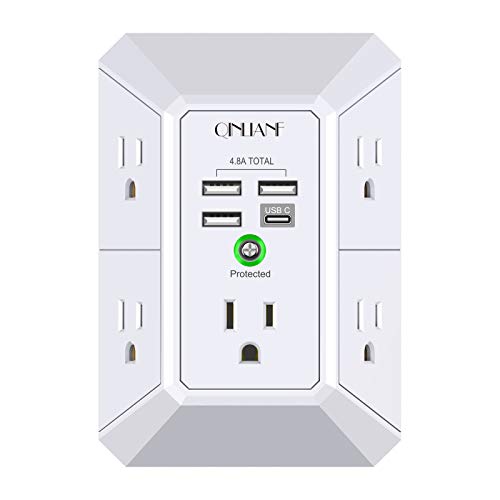
The QINLIANF wall-mounted power extender provides a 3-sided layout with 5 AC outlets and 4 USB ports, totaling 4.8 A across the USBs. Its compact back design fits duplex outlets and keeps cords tidy. The unit includes a mounting screw to secure it to the wall, helping prevent accidental unplugging when devices are removed. USB-C delivers up to 3A, while USB-A ports offer up to 2.4A each. It’s designed for homes or small offices needing space-saving power distribution while preserving outlet accessibility.
One Beat Surge Protector Outlet Extender

The One Beat 10-in-1 style wall outlet extender offers 6 AC outlets with a 180-degree rotating plug and four USB ports (including two USB-C). Its 1800 Joules surge protection and a grounded indicator light help safeguard devices. The rotating plug plus wide spacing between outlets reduces blockage by bulky adapters, making it suitable for desks, home entertainment setups, or travel stations where wall access is critical. It’s designed for easy positioning in tight spaces without blocking neighboring outlets.
HANYCONY Surge Protector 8 Outlets

The HANYCONY model provides eight AC outlets with 4 USB ports (including USB-C). It features overload surge protection and a minimum 1080 Joules energy-absorbing capacity, with a visible surge-protection indicator. The design emphasizes wide outlet spacing and a three-sided configuration to minimize plug blockage. This unit is suitable for a busy home office or media setup where multiple devices need reliable, protected power access from a single wall installation.
Addtam 6-Outlets 4 USB Extension

The Addtam outlet extender offers a slim 6-outlet setup plus 4 USB ports, including two USB-C ports, with smart charging technology to optimize speed. The ultra-thin flat plug and a 5-foot heavy-duty cord allow the unit to sit flush against walls, fitting behind furniture or along desk edges. Its 3-side design provides more room between outlets, helping accommodate larger adapters without blocking adjacent ports.
One Beat Power Strip With USB-C

The One Beat 10-in-1 desktop power strip combines six AC outlets with two USB-A and two USB-C ports. It features smart charging to optimize power delivery for connected devices and a compact, travel-friendly footprint. The three-sided spacing helps prevent bulky adapters from blocking adjacent outlets, while the wall-mountable design and flat plug simplify discreet installation in offices, dorm rooms, or travel setups that require accessible wall power.
Buying Guide: Key Purchase Considerations For Wall-Mounted Power Strips
- Outlet layout and spacing: Choose a three-sided or wide-spacing design to minimize adapter overlap and heat buildup. Larger gaps between outlets support bulky transformers and larger plugs.
- Surge protection and energy rating: Look for Joule ratings (for example, 1080J to 1800J) and built-in protection indicators. Higher ratings commonly provide better spike protection for electronics and computers.
- USB charging capabilities: Evaluate total USB output and port types (USB-A vs USB-C). If you charge tablets or phones, USB-C ports with higher amperage (3.0A+) can improve charging speed.
- Mounting options: Confirm wall- or desk-mount compatibility, screw-in securing, and whether the device requires a flat plug or right-angle plug to fit tight spaces behind furniture or along walls.
- Cord length and portability: A 5-foot cord offers flexible placement; longer cords support distant outlets, while flat plugs reduce wall clearance.
- Safety certifications: ETL or UL-rated products indicate adherence to safety standards, especially for lamps, TVs, and computers connected to surge protectors.
- Overall power capacity: Ensure the total wattage capacity matches your device load. A unit rated around 1875W at 125V suits typical home and office devices but may not handle high-load appliances simultaneously.
- Indoor suitability and heat management: Consider devices with thermal protection or indicators to monitor heat under load in roles like TV stands or workstations.