Finding the right power strip for a standing desk involves balancing reach, outlet spacing, USB charging, and mounting options. The following picks are designed to keep cables tidy, protect devices with surge safeguards, and fit the unique edges of modern standing desks. Each option supports multiple devices, helps reduce clutter, and offers practical mounting or placement features ideal for home offices, coworking spaces, or dorm rooms.
Summary Table of Selected Products
| Product | Brand | Key Features |
|---|---|---|
| Addtam Surge Protector Power Strip | Addtam | 12 AC outlets, 3 USB ports, 10 ft cord, flat plug, wall mount, overload protection |
| Jgstkcity Desk Clamp Power Strip USB C | Jgstkcity | Desk-edge mount, 4 PD USB-C ports, 2 USB-A, 5 outlets, 1200 J, 6 ft flat plug |
| NTONPOWER Standing Desk Power Strip | NTONPOWER | 10 ft elastic coiled cord, 9 outlets, 3 USB, edge mount, 1200 J |
| CCCEI Standing Desk Clamp Power Strip | CCCEI | 15 outlets, PD USB-C, QC USB-A, 6 ft flat plug, desk-edge clamp |
| Anker Power Strip Surge Protector | Anker | 12 outlets, 2 USB-A, 1 USB-C, 5 ft cord, 20 W PD charging |
Addtam 12-Outlet Power Strip With USB
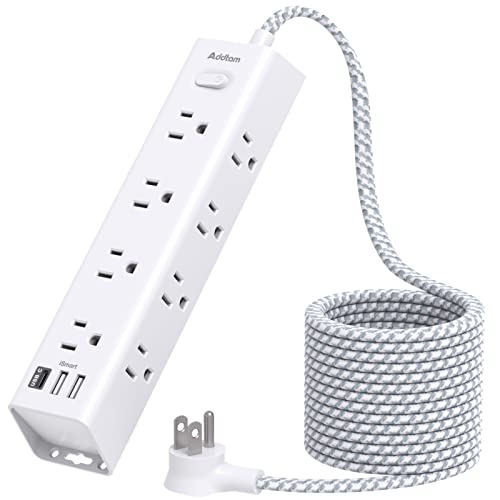
The Addtam Surge Protector Power Strip is designed for clutter-free desks and flexible layouts. It offers 12 widely spaced AC outlets, reducing the common problem of large adapters blocking adjacent outlets. A 10-foot extension cord adds reach for desks set away from the wall, while the flat plug and 45-degree right-angle design help furniture placement behind couches or under desks without crowding nearby outlets. Three USB ports provide dedicated charging for phones, tablets, and wearables, simplifying charging stations for a home office or dorm room. The device supports overload protection and is ETL listed, indicating compliance with safety standards. With a 15-in-1 configuration, this strip is suited for families or shared workspaces where multiple devices must be powered simultaneously. Mounting options help to minimize desk clutter, keeping cables behind the scene while devices stay charged. The longer cord enables flexibility for standing desk setups where the user may move the desk between configurations throughout the day. When installed behind furniture, the flat plug design minimizes protrusion, preserving clear floors and easy movement around the workspace.
Jgstkcity Desk Clamp Power Strip USB C

Jgstkcity offers a desk-edge clamp power strip designed for secure mounting on standing desks. The flexible mounting system clamps to the back or side of a desk, providing a semi-permanent solution that reduces cable management headaches. The unit pumps out a total of 40W via four USB-C ports (PD 20W each) and two USB-A ports, plus five widely spaced outlets for traditional adapters. This arrangement makes it ideal for charging laptops, tablets, smartphones, and other devices without needing additional wall outlets. The clamp design keeps the power strip anchored and reduces accidental displacement during movement. A 6-foot flat plug keeps the setup slim, which is beneficial in tight desk alcoves. The product uses fire-retardant materials and includes overload protection, offering a layer of safety for high-traffic workstations or shared spaces. Overall, it suits users who want a clean, mounted power hub that blends into a modern, minimalist desk aesthetic while supporting multiple devices and fast USB charging.
NTONPOWER Standing Desk Power Strip

The NTONPOWER standing desk power strip introduces a 10-foot elastic coiled extension cord, designed to stay tidy and prevent trailing cords on the floor as the desk moves. Its detachable desk clamp supports semi-permanent mounting to the desk edge, ensuring stability even with frequent adjustments. The unit packs 12 devices into 9 AC outlets plus 3 USB ports, making it suitable for a full desktop charging station without the need for extra adapters. The 1200 Joules surge protection helps safeguard sensitive electronics from surges and brownouts, while the compact design minimizes footprint on the desk surface. This power strip is particularly useful for users who want a neat, adjustable charging hub that can evolve with a sit-stand setup, offering enough capacity to support multiple monitors, docking stations, and peripheral devices. It’s a practical choice for home offices where space is at a premium and cable management matters.
CCCEI 15-Outlet Desk Clamp Power Strip

The CCCEI desk clamp power strip emphasizes space optimization with 15 outlets arranged for minimal crowding. The device includes QC 3.0 USB-A ports and PD 3.0 USB-C ports, enabling fast charging for phones, tablets, and laptops. A 6-foot flat plug and a compact footprint allow easy integration on desk edges without creating bulk behind the monitor or other peripherals. The clamp-based mounting provides a secure, semi-permanent solution that protects cables from being tugged or dislodged. With a maximum output of 1500W, this unit can support multiple devices concurrently, including power-hungry monitors and laptops. It’s particularly well-suited to busy home offices or shared workspaces where desk edge space is at a premium and a robust USB charging array is desired alongside traditional outlets.
Anker 12-Outlet Surge Protector With USB

The Anker surge protector balances power and versatility with 12 AC outlets, plus 2 USB-A ports and 1 USB-C port, all accessible from a compact 5-foot extension cord. The 20W USB-C PD charging can rapidly power compatible devices like newer phones or tablets, complemented by USB-A fast charging for older devices. Anker’s 8-point safety system integrates surge protection, fire resistance, overload protection, and temperature control to safeguard equipment during surges or heat buildup. This makes it a reliable option for a standing desk where multiple devices — from a computer tower or monitor to a wireless charger and peripherals — require reliable, rapid charging without clutter. The slim profile and extra outlets support cable management while maintaining easy access to every outlet in dense workstation layouts.
Buying Guide: What To Consider When Choosing a Power Strip For Standing Desks
- Outlet spacing and wattage: Standing desks often require multiple large adapters. Look for wide-spaced outlets to prevent plug blocking and a high total wattage rating (at least 1875W/15A) to handle monitors, laptop chargers, and other peripherals.
- USB charging: If you rely on USB devices, select models with multiple USB-A and USB-C ports, ideally with USB-C PD for fast charging of laptops and tablets.
- Mounting options: Desk-edge clamps, wall mounts, and flat-plug designs help keep the workspace tidy. Clamp mounts reduce the risk of accidental unplugging and keep cables out of the way when the desk is moved.
- Cord length and flexibility: A longer cord or a coiled extension can provide more placement options for standing desks that move up and down. Coiled cords prevent tripping hazards and excess slack.
- Surge protection and safety features: Look for units with surge protection ratings (Joules), overload protection, and materials rated for heat resistance. Safety listings (ETL, UL) indicate compliance with standards.
- Durability and materials: Fire-retardant housings and rugged construction help ensure longevity in busy home offices where devices are plugged in for extended periods.
- Cable management considerations: Models with flat plugs, anti-slip mats, and detachable sections can improve desk organization and reduce clutter behind shelves or media stands.
- Expandability vs. clutter: Balance the need for many outlets with the risk of creating a tangled cable landscape. Choose a setup that aligns with your device count and future needs.
- Water and environmental safety: For desks placed near windows or in humid rooms, select products with protective coatings and safety approvals suitable for the environment.
In selecting a power strip for a standing desk, prioritize mounting versatility, sufficient outlet spacing, and a strong USB charging set. The five options highlighted above provide a range of configurations—from clamp-mounted to wall-mounted designs—so users can tailor their setup to fit their desk edge, movement range, and device demands. Each choice emphasizes safety, expandability, and organization to support a productive, clutter-free work environment.