External power supplies and high-capacity power banks have become essential tools for travelers, remote workers, and students who rely on laptops, tablets, and phones throughout the day. The best options combine high wattage, multiple outputs, fast charging, and reliable safety features. This guide highlights five top picks that balance power, portability, and practicality for American users. Each product supports laptop charging while offering versatile USB-C and USB-A ports for other devices. Below you’ll find concise buying insights and a quick comparison table to help you choose the right external power supply for your laptop needs.
Product Overview
| Product | Brand | Capacity | Notable Features |
|---|---|---|---|
| INIU 140W Power Bank | INIU | 27000mAh | PD 3.1, high-speed charging, digital display, 3-year warranty |
| Anker 737 Power Bank | Anker | 24000mAh | 140W fast charging, smart display, two-way charging |
| UGREEN Power Bank 25,000mAh | UGREEN | 25000mAh | 145W PD, multi-port, bi-directional charging |
| GENSROCK Portable Power Bank | GENSROCK | 24000mAh | 150W peak AC outlets, 8 outputs, safe BMS |
| ANSODY 140W Power Bank | Ansody | 25000mAh | 140W max, multi-port, three-port charging |
INIU 140W Power Bank — High-Cpeed Laptop Charging

The INIU 140W Power Bank provides a high-capacity, portable solution for laptop users who need fast, reliable charging away from traditional outlets. It features 140W PD 3.1 PowerNova technology designed to power demanding devices such as MacBook Pro models and SteamDeck. A digital display helps track power input and output in real time, and the device is backed by INIU’s safety credentials, including a long-standing 3-year warranty and lifetime technical support for added peace of mind. With a 27,000mAh capacity, users can expect multiple full charges for laptops and tablets while on the move. The unit emphasizes safety by employing high-quality materials and thoughtful thermal management.
Key insights for buyers: assess the wattage margin for your laptop, confirm PD 3.1 compatibility with your device, and consider the balance between capacity and weight for travel. This power bank is particularly suitable for travelers, students, and professionals who rely on high-powered laptops and devices throughout the day.
Anker 737 Power Bank — 140W, Smart Display
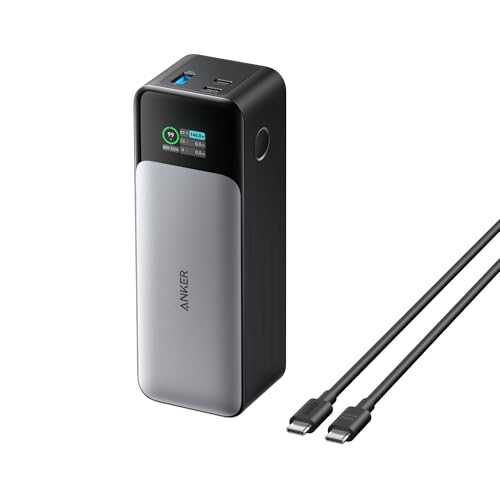
The Anker 737 Power Bank combines a large 24,000mAh capacity with 140W fast charging, enabling rapid replenishment of laptops and mobile devices. The integrated smart display provides real-time details on output, input power, and estimated recharge times, helping users monitor remaining energy and plan charging stops. Its rapid two-way charging uses Power Delivery 3.1 technology, enabling quick recharges of both the power bank and connected devices. The unit is designed for outdoor work and travel, supporting demanding devices including MacBook, iPhone, and iPad models. It’s a practical choice for professionals who need dependable power during long days away from outlets.
Buying note: ensure you use a compatible high-quality USB-C cable and, if possible, a 140W charger to maximize charging speed. The display feature is particularly helpful for users who juggle multiple devices in busy schedules.
UGREEN 25,000mAh — 145W Laptop Charger

The UGREEN Power Bank delivers a robust 145W total output with PD3.1 and QC3.0 support, enabling extremely fast charging for laptops, phones, and tablets. Its 25,000mAh capacity balances travel usability with practical weight. A single USB-C port can supply up to 140W, making it capable of powering high-demand laptops quickly. The device also supports two-way fast recharge, allowing the power bank itself to recharge rapidly when paired with a compatible charger. This model is well-suited for professionals who frequently travel, switch between devices, and need dependable, compact power on the road.
Considerations: ensure your device is compatible with 140W USB-C charging, and plan for multi-device charging scenarios to maximize the multi-port design.
GENSROCK Portable Power Bank — 150W Peak AC

The GENSROCK power bank combines a 24,000mAh capacity with two 120W (150W peak) AC outlets, making it one of the more versatile options for plugging in larger devices directly. With eight output ports, including DC ports and USB-C/USB-A options, it covers a wide range of charging needs for laptops, cameras, drones, and peripherals. The device includes a protected battery management system to prevent overcharge and overdischarge, and a cooling fan assists in thermal regulation during heavy use. This model is ideal for outdoor activities, camping, or home office setups where wall outlets are scarce.
Practical tip: because it includes AC outlets, ensure you have appropriate plugs and adapters for your equipment, and monitor power draw to avoid tripping protection circuits when running multiple devices simultaneously.
ANSODY 140W Power Bank — Multi-Port Charging

The ANSODY 140W Power Bank distributes up to 140W of power, with a three-port design designed to charge three devices at once. The unit emphasizes fast charging performance for laptops and mobile devices alike, delivering efficient power delivery through two USB-C ports and an additional USB port. The 25,000mAh capacity supports multiple laptop charges and ample time between recharges. This model is a strong option for users who want a compact, three-port charger that can handle laptops during travel or extended work sessions away from traditional outlets.
Bottom-line considerations: verify compatibility with your laptop’s USB-C PD requirements and assess whether three simultaneous ports meet your typical charging habits. The distribution of power across ports might affect charging times for each connected device.
Buying Guide — Key Purchase Considerations
- Power output and laptop compatibility: Look for PD 3.0/3.1 support and a wattage high enough to charge your specific laptop model efficiently. For large laptops, prioritize models advertised with 100W+, ideally 140W or higher if your device supports it.
- Battery capacity vs. weight: Higher mAh means more charges between recharges, but it also adds weight. Balance capacity with portability based on your travel patterns and airline restrictions.
- Port selection: A mix of USB-C PD, USB-A, and, if needed, an AC outlet can expand versatility. If you regularly charge a MacBook and a phone at once, a multi-port design is beneficial.
- Safety features: Look for overcurrent, overvoltage, short-circuit protection, and thermal management. Reputable brands typically provide warranties and responsive support.
- Display and monitoring: A built-in digital display helps track remaining power and charging status, making it easier to plan when to recharge the power bank itself.
- Weight and form factor: For travel-centric users, a compact, slim form factor with a strong wattage rating is ideal. Bulky options can still be valuable for backup power at home or in the office.
- Airline policies: Some high-capacity packs exceed common airline limits. Check current regulations for lithium-ion battery devices and any restrictions on 100Wh–27000mAh batteries.
- Brand reliability and warranties: Choose brands with recognized safety histories and long warranty terms, especially if you rely on the device for critical daily tasks.
How To Use External Power Supplies With Laptops
Charge a laptop by connecting the USB-C PD port to the device’s charging input with a compatible USB-C cable. If the power bank supports two-way charging, you can recharge the power bank while powering the laptop. When using a device with an AC outlet, ensure the power bank is placed on a stable surface and consider ventilation to prevent overheating during heavy usage. For on-the-go use, plan charging intervals around work sessions and meetings to minimize the risk of device downtime.
In summary, selecting the right external power supply for your laptop depends on capacity needs, the devices you plan to run simultaneously, and how often you travel. The five options covered above provide a lens into different design priorities—from ultra-fast PD charging to multi-port versatility and occasional AC outlet support. Each model serves a distinct use case, whether you prioritize light travel, multi-device support, or maximum laptop charging efficiency.