Transform a cluttered desk into a clean, wired-ready workspace with power strips designed for desks, desks edges, and compact setups. The following picks balance outlet count, USB charging options, space between outlets, and desk-macing features like clamp mounts and flat plugs. Each option supports multiple devices, helps prevent outlet blocking, and ships with safety protections to guard electronics.
Summary of chosen products:
| Product | Outlet Count | USB Ports | Special Feature | Format |
|---|---|---|---|---|
| HANYCONY 12 IN 1 Power Strip | 8 AC outlets | 4 USB (2 USB-C) | 3-side design; wide spacing between outlets | Standard power strip with 5 ft braided cord |
| YISHU 6 Ft 8-Outlet Surge Power Strip | 8 AC outlets | 4 USB (2 USB-C) | 3-side design; wide spacing | Flat plug; 6 ft cord |
| Anker 300J Flat Plug 10-in-1 | 6 AC outlets | 4 USB (2 USB-C) | Slim, desk-friendly footprint | Flat plug; 5 ft cord |
| Mifaso PD30W Desk Clamp Power Strip | 4 AC outlets | 2 USB-A; 1 USB-C | Under-desk clamp; PD charging | Desk-edge mount; 5 ft cord |
| Addtam 12+ Outlets 15-in-1 | 12 AC outlets | 3 USB (1 USB-C) | Long 10 ft cord; ETL listed | Wall/desk mount; flat design |
Notes: All products are designed to reduce desk clutter by combining multiple outlets with USB charging, compact footprints, and mounting options. In this guide, each pick is evaluated for desk compatibility, space efficiency, and safety features.
HANYCONY 12 In 1 Power Strip

Overview: A 12-in-1 surge protector combines 8 AC outlets with 4 USB charging ports, including 2 USB-C ports, across a compact 5-foot braided extension cord. The 3-side design spaces outlets to minimize crowding, enabling larger adapters without blocking adjacent sockets. The unit includes overload protection and a visible surge-protection indicator for quick status checks. USB ports support fast charging with smart-detect technology, helping devices like phones and tablets charge efficiently.
YISHU 6 Ft Surge Protector

Overview: This 8-outlet, 4-USB power strip features a 3-side design and wider spacing to prevent plug blockage. The 6-foot cord provides flexibility to place the strip away from a cluttered desk while maintaining accessibility. It supports a broad input range (100–240V) and includes ETL certification for safety, offering overload and short-circuit protection to guard connected devices. USB ports deliver up to 2.4A for USB-A and 3A on USB-C ports for faster charging.
Anker 300J Flat Plug 10-in-1

Overview: A slim, desk-friendly 10-in-1 hub that includes 6 AC outlets, 2 USB-A ports, and 2 USB-C ports. The flat plug design helps minimize obstruction behind furniture and on tight desks. Its compact footprint reduces desk clutter while maintaining reliable power distribution for multiple devices, including laptops and mobile devices. The unit emphasizes efficient charging alongside a clean, low-profile appearance.
Mifaso PD30W Desk Clamp Power Strip

Overview: This under-desk clamp power strip mounts securely to the desk edge and provides 4 outlets plus 2 USB-A and 1 USB-C port, with a 30W USB-C Power Delivery charger. It supports charging up to 8 devices simultaneously, making it a robust solution for compact workstations. The clamp design is intended for easy installation without drilling, protecting the desk surface with foam padding and providing a tidy, accessible power distribution hub near a user’s typing area.
Addtam 15-In-1 Desk Power Strip
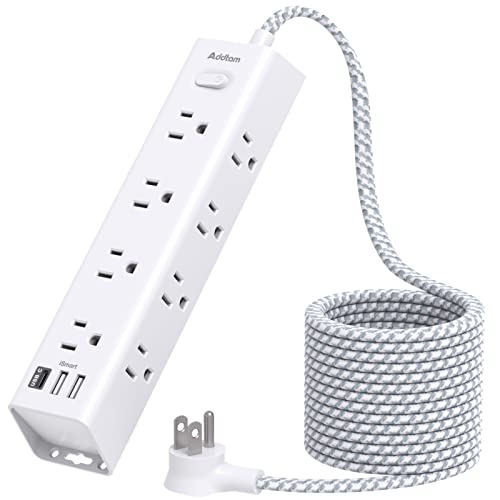
Overview: This 12-outlet-plus-3-USB setup emphasizes a long reach with a 10-foot extension cord, enabling flexible desk placement. The design includes three USB ports (one USB-C) and a surge-protected framework. It suits larger desks or collaborative spaces where multiple devices demand simultaneous charging. The flat plug and wall-mount option add versatility for personal and shared workstations while maintaining a neat surface area.
Buying Guide
Key considerations when choosing a desk extension cord or power strip:
- Outlet layout and spacing: Look for wide spacing between outlets to accommodate large adapters without blocking adjacent sockets. A 3-sided design can further improve access in tight desk corners.
- USB charging efficiency: Check USB-A and USB-C port outputs. Smart charging and higher total USB output speed up device charging, especially for phones, tablets, and laptops.
- Mounting options: Desk clamps, wall-mountable designs, and flat-plug configurations reduce desk clutter and create cleaner setups behind furniture or on the desk edge.
- Surge protection and safety: Opt for units with overload protection, circuit breakers, and a robust joule rating to protect sensitive electronics from spikes.
- Cord length and flexibility: Longer cords offer placement options but can add clutter if not managed. Flat plugs help fit behind furniture and reduce snagging behind walls or desks.
- Portability and dorm suitability: For students or temporary workspaces, compact, lightweight designs with easy mounting features are advantageous for moving between rooms.
- Certification: ETL or UL listings indicate compliance with safety standards, providing added assurance for daily desk use.
- Power distribution capacity: Consider total wattage and per-port max outputs to ensure the strip can handle full device loads without tripping or overheating.
Overall, the best choice depends on desk size, device count, and preferred mounting style. For multi-device desks, options with 8 or more outlets and multiple USB ports balance accessibility with cable management. For slimmer setups, a flat-plug, compact, or clamp-mounted model can dramatically improve workflow without sacrificing power reliability.