Managing cables behind desks and workstations is essential for safety, airflow, and a neat appearance. This article highlights five top cable trays and under-desk organizers that fit a variety of setups—from compact home offices to robust, heavy-duty workstations. Each section outlines key features to help you compare options for your needs.
Summary Table — Selected Products
| Product | Brand | Key Benefit | Approx. Capacity |
|---|---|---|---|
| Under Desk Cable Management Tray 2 Pack | Litwaro | No-drill mounting; desk-friendly clamp system | Up to 15 lbs per tray |
| Cable Raceway Kit Open Slot | Stageek | Wall-mounted concealment; easy one-piece design | 9 channels across 15.4″ sections |
| [Upgraded] 2 Pack Cable Management Under Desk Tray | Xpatee | Compatible with thicker desks; no-drill installation | Up to 3″ thickness |
| Univivi No Drill Under Desk Cable Tray | Univivi | Large capacity; dual installation options | 36″ long |
| VIVO Under Desk 17 Inch Extra Deep Tray | VIVO | Extra deep for power strips and large bundles | 17″ x 6″ x 5.8″ |
Under Desk Cable Management Tray 2 Pack — Litwaro

Litwaro’s no-drill cable tray is designed for quick setup in as little as three minutes. Side clips clamp the desk edge, with side holes allowing flexible cable routing and excess wire collection. It supports inward or outward installation to suit different desks and keeps cords organized with two side-entry openings. Built with carbon steel, the tray holds about 15 lbs and includes soft rubber pads to prevent desk scratches. It works across desk thicknesses from 0.4″ to 2″ and accommodates a tidy, accessible cable layout beneath the desk.
Cable Raceway Kit Open Slot With Cover — Stageek

Stageek offers a wall-mounted cable raceway system with a concealed cover for clean aesthetics. The kit includes nine pre-cut channel sections (15.4″ each) and is designed for easy installation with strong adhesive tape or screws. The open-slot design minimizes the need for cuts, while the included screws and drywall anchors provide optional secure mounting. It’s well-suited for hiding wall-mounted TV cords, computer cables, and other long runs along walls, with a focus on safe, low-profile cable management.
[Upgraded] 2 Pack Cable Management Under Desk Tray — Xpatee

Xpatee’s upgraded under-desk tray is designed for desks up to 3″ thick, featuring clamp brackets and non-slip pads to prevent desk damage. The dual open-slot design simplifies adding or rearranging cables without unplugging devices, while a mesh interior reduces dust buildup and improves heat dissipation. Installation is no-drill, and the system accommodates inside or outside desk mounting, making it adaptable for slim or constrained workspaces while maintaining easy access to outlets and power strips.
Univivi No Drill Under Desk Cable Tray — 36″ Cord Organizer
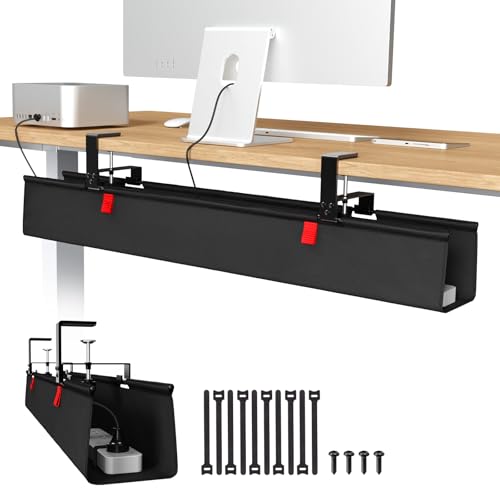
Univivi provides a large-capacity tray ideal for busy workstations. The 36″ length supports many adapters and sockets, making it effective for hiding a broad array of cords. It offers two installation modes—no-drill clamp-on and screw fixing—so you can attach it to wood, glass, or metal surfaces. The tray can be unfolded for easier item addition or removal, and built-in ties help secure cables, reducing clutter and improving airflow under the desk.
Large Under Desk Cable Management Tray — G.Sumiker
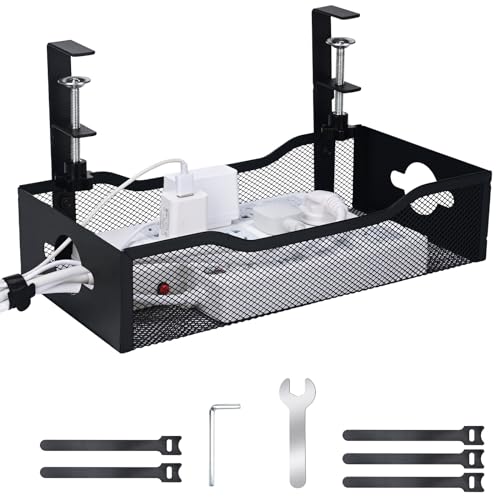
G.Sumiker’s heavy-duty tray is built from steel and offers a 13.38″ x 7″ extra-large surface for power strips and multiple cords. It features tool-free installation with adjustable brackets to fit desk thicknesses from 0.4″ to 2″. No drilling is required, and the open-grid design allows easy cable adjustments and airflow. Integrated cable ties help organize bundles, supporting a neat, professional workspace while reducing trip hazards.
VIVO Under Desk 17 Inch Extra Deep Tray — DESK-AC16-1C

VIVO’s extra-deep tray provides substantial space for power strips, AV cables, and multiple cords. The 17″ length and 6″ width create a roomy channel for complex setups, with closed back for concealment and an open front for easy cable access. It installs under desks with included screws and is designed to maintain airflow while keeping devices hidden from view, making it suitable for home offices and professional environments alike.
Buying Guide: Key Purchase Considerations
- Desk compatibility: Check thickness tolerances and whether the tray clamps or requires screws. No-drill options protect fragile surfaces but may have weight limits.
- Capacity and space: Measure the available under-desk area and count how many power strips, adapters, and cables you need to manage. Consider extra-deep or larger trays for larger setups.
- Ventilation and heat: Open-grid or ventilated designs help air flow around power supplies and routers, reducing heat buildup.
- Accessibility: Decide if you need front-access channels or rear concealment. Easy access aids maintenance and reconfigurations.
- Cable management features: Look for built-in ties, openings for cable routing, and compatibility with edge mounting on inward or outward setups.
- Durability and finish: Materials like powder-coated steel offer durability and scratch resistance, important for long-term use.
- Installation method: Weigh the trade-offs between speed (no-drill) and permanence (screws). Some desks require edge mounting or inside/outside placement.
- Aesthetics and clutter: Choose a black or neutral finish that blends with office furniture and maintains a clean appearance.
- Modularity: If you expect future changes, consider trays that allow expansion or multiple units that can be reconfigured.
- Maintenance: Look for dust resistance and easy cleaning, especially for open-slot designs that collect dust over time.