Keep AV gear, receivers, and media cabinets within optimal temperatures with quiet, efficient cooling fans. This guide highlights five top cabinet cooling solutions designed to minimize noise while maximizing airflow for electronics racks, home theaters, and entertainment centers. Each option balances quiet operation, smart controls, and durable construction to help prevent overheating and performance issues.
Summary of Selected Products
| Product | Brand | Main Benefit |
|---|---|---|
| AC Infinity AIRPLATE S5 | AC Infinity | Ultra-quiet, 8″ cabinet cooling with speed control |
| AC Infinity MULTIFAN S7 | AC Infinity | Quiet dual 120mm USB fans with flexible mounting |
| AC Infinity AIRPLATE T3 | AC Infinity | 6″ thermostat-controlled cooling with digital readout |
| AC Infinity AIRPLATE T8 White | AC Infinity | 6″ dual-fan system with thermostat, LCD, and memory |
| AC Infinity AIRCOM S7 | AC Infinity | 12″ top-exhaust cooling for AV components |
AC Infinity AIRPLATE S5: Quiet 8″ Cabinet Cooling
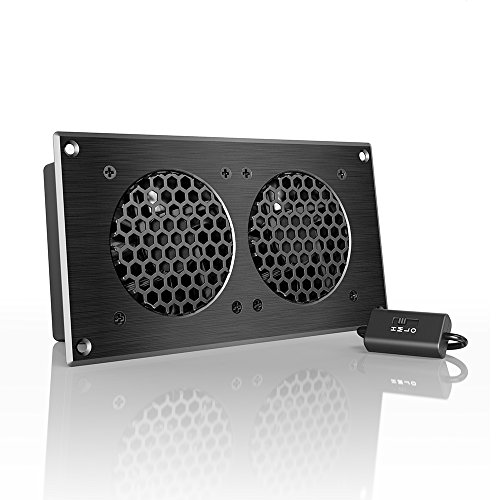
The AIRPLATE S5 is a compact, UL-certified fan system optimized for cabinet cooling with minimal noise. Its 8-inch design fits standard AV cabinets while delivering steady airflow to prevent heat buildup in receivers, amplifiers, and media components. A multi-speed controller allows users to dial in a balance between noise and cooling effectiveness, making it suitable for environments requiring quiet operation without sacrificing airflow. The system features a CNC-machined aluminum frame with a modern brushed black finish, contributing to both performance and aesthetics in living rooms and media rooms.
AC Infinity MULTIFAN S7: Quiet Dual 120mm USB Fans
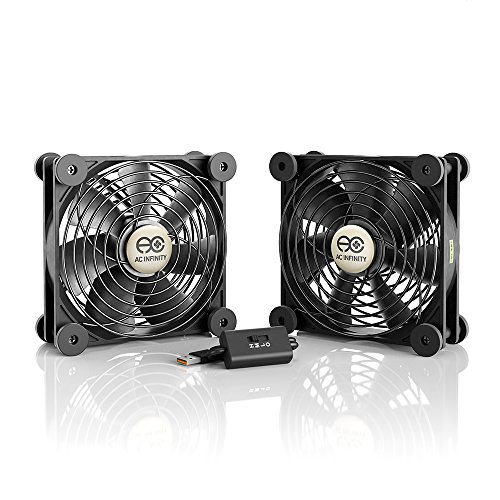
The MULTIFAN S7 provides flexible, quiet cooling for a range of electronics components. These UL-certified USB fans come with a multi-speed controller to tune fan speed for the desired noise and airflow level. Dual-ball bearings extend lifespans to about 67,000 hours, and the fans can be mounted horizontally or vertically, offering versatile placement options inside cabinets, drawers, or on racks. This pair is ideal for compact setups where silent operation is important, such as a bedroom AV cabinet or a small gaming console area.
AC Infinity AIRPLATE T3: Thermostat-Controlled 6″ Cooling

The AIRPLATE T3 offers a compact 6″ cooling solution with onboard thermostat control for precise temperature regulation inside cabinets. An integrated digital readout shows cabinet temperatures, enabling proactive cooling adjustments. Features include thermostat control, fan speed control, and a SMART energy-saving mode, helping reduce electricity use while keeping temperatures in check for sensitive electronics like AV receivers and set-top devices.
AC Infinity AIRPLATE T8 White: Dual-Fan Thermostat System

The AIRPLATE T8 White combines two quiet 6″ fans with thermostat control and automated programming that self-adjusts cooling power as temperatures fluctuate. The system includes an LCD display with an alarm, a display lock, six fan speeds, two buffer options, and memory. This setup is well-suited for media cabinets housing multiple devices or larger AV racks requiring reliable, automated cooling without manual intervention.
AC Infinity AIRCOM S7: Top-Exhaust 12″ Cooling

The AIRCOM S7 is designed for top-exhaust cooling of larger AV components like receivers, amps, and DVRs. A top-exhaust configuration helps dissipate internal heat efficiently in taller cabinets. The system provides quiet operation and protects components from overheating, reducing performance issues and potential longevity concerns. It includes programmable options with two thermal trigger modes and four speed control settings for flexible, automated cooling.
Buying Guide: Cabinet Fans For Electronics
- Noise vs. airflow balance: For living space setups, prioritize solutions with quiet operation and adjustable speed. Look for multi-speed controllers, SMART modes, or thermostat control to match cooling needs without adding audible disturbance.
- Control features: Thermostats, digital readouts, and adjustable memory settings help maintain stable temperatures. If you have a mix of devices with different heat profiles, a system with programmable thresholds can prevent overheating without constant manual tweaks.
- Ventilation method: Top-exhaust, front-to-back, or panel-mounted designs offer different airflow patterns. Choose based on cabinet layout: top-exhaust works well for tall stacks; front-to-back is useful when devices are aligned face-to-face; panel-mounts blend into slim enclosures.
- Size and compatibility: Match fan size to your cabinet dimensions (6″, 8″, 12″ options exist). Ensure mounting options fit your cabinet material and hardware. Consider whether the system supports vertical or horizontal mounting as needed.
- Durability and certifications: UL-certified units and high-quality bearings extend life in continuous operation. Aluminum frames and robust housings add durability for long-term use in racks or entertainment centers.
- Power considerations: USB-powered fans are convenient for small setups, while 120V AC options provide higher airflow for larger cabinets. Verify power requirements and available outlets in your cabinet area.
- Energy efficiency and maintenance: Look for smart modes and energy-saving features to reduce power draw. Check for long Bearing life, easy cleaning, and simple filter or grill maintenance if applicable.
- Aesthetics and integration: A brushed aluminum or white finish can match modern AV furniture. Some models include LCD displays or memory features that blend into home theater decor without drawing attention.