Balancing power over Ethernet with intelligent management or simple plug-and-play operation, 8-port PoE switches are a practical upgrade for surveillance, IP phones, cameras, and access points. The following selections emphasize reliable PoE budgets, ease of use, and compact form factors suitable for desktops or wall/ rack mounting. This guide highlights five top picks from reputable brands to help you choose the right mix of features and value.
| Product | Brand | PoE Budget (Total) | Key Strength |
|---|---|---|---|
| NETGEAR GS308EP | NETGEAR | 62W | Easy Smart management |
| TP-Link LS108GP | TP-Link | 65W | Extend Mode and PoE Auto Recovery |
| TP-Link TL-SG1210MP | TP-Link | 123W | Power prioritization and expandability |
| NETGEAR GS308PP | NETGEAR | 83W | Unmanaged with PoE+ |
| NETGEAR GS108PP | NETGEAR | 123W | QoS and high PoE budget |
NETGEAR 8 Port PoE Gigabit Easy Smart Managed Essentials Switch

The NETGEAR GS308EP provides eight Gigabit ports with eight PoE+ ports and a 62W total power budget. It runs Easy Smart Managed Essentials software for basic configuration, security, and monitoring, making it suitable for small offices or home studios deploying IP cameras, phones, or wireless access points. Desktop or wall-mount capable, this switch balances compact design with essential management features. It supports straightforward plug-and-play alongside the PoE capabilities that simplify device deployment without a separate power source for each device.
TP-Link LS108GP 8-Port PoE Gigabit Switch

The TP-Link LS108GP features all eight PoE+ ports with a combined budget of 65W and up to 30W per port. Its Extend Mode extends PoE transmission distance, making it suitable for larger installations such as CCTV deployments or multi-building networks. Extend Mode, PoE Auto Recovery, and a compact desktop/wall-mount form factor highlight a blend of practical features for surveillance and access deployments, with minimal configuration required for immediate use.
TP-Link TL-SG1210MP 8-Port Gigabit PoE Switch

The TL-SG1210MP offers 8 PoE+ ports with a 123W total budget and two uplink Gigabit ports plus a combo SFP slot. It supports Extend, Priority, and Isolation modes, enabling flexible deployment for surveillance, IP phones, and wireless access points. Its plug-and-play setup simplifies initial installation, while power prioritization helps maintain critical services during peak demand.
NETGEAR GS108PP 8-Port PoE+ Gigabit Switch
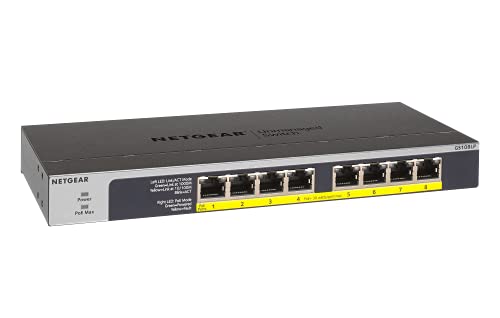
The NETGEAR GS108PP emphasizes high PoE budget with 123W total, suitable for networks requiring robust PoE+ support across all ports. It provides plug-and-play setup with QoS (IEEE 802.1p and DSCP) to prioritize mission-critical applications, making it a dependable choice for small offices that rely on IP cameras, VoIP, and wireless access points without requiring a software management layer.
NETGEAR GS108PP and Similar Models Overview
Note: Several NETGEAR 8-port PoE switches share similar feature sets, including PoE budget ranges (from 83W to 123W) and QoS or basic management features. The unmanaged GS108PP and the managed GS308EP both offer reliable PoE support with varying degrees of control. When selecting, consider whether you need plug-and-play simplicity or light management functionality to segment traffic and monitor power usage across devices.
Buying Guide: Key Purchase Considerations
Purpose and deployment: Determine whether you need unmanaged plug-and-play simplicity or a managed/Smart switch with basic configuration tools. For surveillance or multi-device environments, a PoE budget in the 60–120W range across 8 ports provides flexibility for cameras, phones, and access points.
- PoE Budget and Per-Port Power: Look for a total budget that matches your planned devices. If you plan to run multiple PoE devices, 83W–123W budgets are common and provide headroom for 8 devices at up to 30W each.
- Management Features: Easy Smart or basic managed capabilities help configure VLANs, security, and traffic monitoring. Unmanaged switches offer straightforward plug-and-play but lack monitoring.
- Extend Mode and Distance: Some switches offer Extend Mode to push Ethernet power and data further, typically up to a few hundred feet, at reduced data speeds. This is valuable for cameras spread across larger areas.
- Port Configuration and QoS: For voice, video, and critical applications, QoS and port prioritization ensure reliable performance when bandwidth is shared.
- Build and Noise: If the switch sits in a workspace, a fanless, compact design reduces noise. Metal enclosures often offer durability for desk or rack mounting.
- Form Factor and Mounting: Desktop, wall-mount, or rack-mount compatibility affects placement. Consider a model that fits your current setup and future expansion.
- Future-Proofing: If you expect higher camera resolution or more PoE devices, a higher total budget and more advanced management features can help avoid replacements later.
In evaluating options, compare not only the PoE budget but also the user experience of the management interface, the quality of the switching fabric, and the reliability track record of the brand. For small offices or homes with growing networks, an 8-port PoE switch with a robust budget and either simple management or reliable unmanaged operation typically yields the best balance of performance and cost.