In network setups, a compact in-wall network cabinet helps protect gear, manage cables, and free floor space. This guide compares top wall-mounted server cabinets, highlighting depth, security features, and adaptability. Read on to find a model that fits your equipment and room layout without sacrificing accessibility or cooling.
| Product | Brand | Depth | Capacity | |
|---|---|---|---|---|
| NavePoint 12U Server Rack Enclosure | NavePoint | 17.72″ L x 21.65″ W x 24.42″ H | 12U | Tempered glass door with security lock |
| Tecmojo 6U Wall Mount Server Cabinet (Glass Door) | Tecmojo | 13.78″ H x 21.65″ W x 17.72″ D | 6U | Lockable glass door and side panels; adjustable rails |
| Tecmojo 6U Wall Mount Rack Cabinet (White) | Tecmojo | 17.7″ Depth | 6U | Lockable front door; built-in cooling fan |
| VEVOR 9U Wall Mount Network Cabinet | VEVOR | 15.5″ Depth | 9U | Ventilated top/bottom/rear for airflow |
| StarTech 4-Post 12U Wall Mount Cabinet | StarTech | Up to 16″ mounting depth | 12U | Enclosed, lockable, with removable front door and side panels |
Selecting an in-wall cabinet depends on depth, weight capacity, security, and airflow. The products below illustrate a range of depths, locking features, and configurations to suit classrooms, retail spaces, offices, and data rooms. Each entry includes a concise overview, the mounting depth, and the type of door or access controls to help you compare at a glance.
NavePoint 12U Wall Mount Cabinet With Glass Door
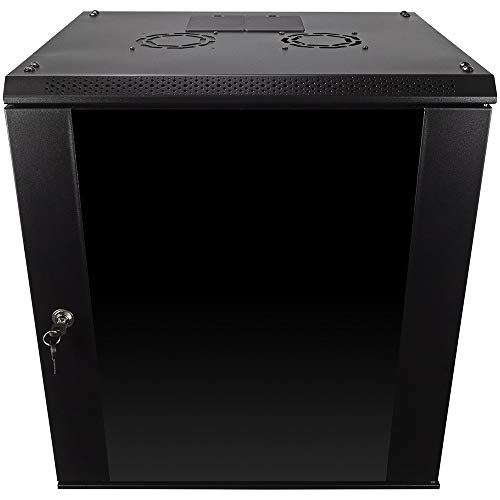
The NavePoint 12U cabinet provides a compact footprint with a 12U capacity and a 17.72″ depth. It features a reinforced welded steel frame designed to support up to 110 lbs of IT gear. A tempered glass front door adds security through an integrated lock, while removable side panels offer convenient access for cable management and service. The door includes a lock, and the overall design supports flexible installation with top and bottom cable pass-through options. Ideal for space-constrained environments where secure access is essential.
Tecmojo 6U Wall Mount Cabinet With Glass Door

This 6U Tecmojo cabinet saves floor space while offering secure access with a glass door and lockable side panels. It includes fully adjustable mounting rails with numbered U positions and square mounting holes for easier equipment installation. The front door can be mounted on either side, allowing flexible door swing orientation. Cable management is supported by top and bottom punch-out panels, and the unit is designed to keep critical gear secure in a compact wall-mount form factor.
Tecmojo 6U White Wall Mount Rack Cabinet

In a white finish, this 6U cabinet prioritizes ventilation and security. It includes a built-in top fan and flow-through ventilation to prevent overheating, along with tempered glass front door and lockable side panels. The cabinet offers easy configuration with adjustable rails and U-position labeling. Its depth supports mid-range equipment while maintaining a neat wall footprint, suitable for offices, classrooms, or store backrooms requiring reliable rack integration and controlled access.
VEVOR 9U Wall Mount Cabinet With Locking Glass Doors

The VEVOR 9U cabinet combines a 15.5″ depth with locking glass doors and side panels, offering solid security for network gear. It emphasizes space efficiency for smaller retail spaces, classrooms, and back offices. With a sturdy welded frame and a 100 lbs wall-mounted capacity (200 lbs when ground-mounted), this enclosure accommodates multiple devices while ensuring reliable airflow through vents designed to prevent overheating. It presents a balanced option for users seeking a deeper, secure wall cabinet without stepping up to larger formats.
StarTech 4-Post 12U Wall Mount Cabinet

The StarTech 4-Post 12U wall-mount cabinet offers a robust four-post design and a 2.4″ to 16″ adjustable depth, ideal for mounting switches, patch panels, and other rackmount gear. It ships fully assembled and features an enclosed, lockable cabinet with a reversible, removable front door and removable side panels for rear access. Built from SPCC cold-rolled steel, this unit supports up to 198 lbs and is designed for demanding environments where accessibility, security, and structural integrity are priorities.
Buying Guide: Key Considerations For In-Wall Network Cabinets
- Depth and mounting options: Choose a cabinet with a depth that fits your equipment and allows for cable management. Deeper units support more devices and easier airflow but take more wall space.
- Security features: Locking doors and side panels deter unauthorized access. Consider whether you need a front door that can swing on either side or a fully lockable enclosure for sensitive gear.
- Weight capacity: Verify both wall-mounted and potential ground-mounted limits. Heavier equipment requires sturdier frames and appropriate mounting hardware.
- Ventilation and cooling: Cabinets with vents, top fans, and rear airflow help prevent overheating in dense equipment setups. Assess whether passive vents suffice or if active cooling is necessary.
- Cable management: Look for top/bottom punch-out panels and removable side panels to simplify cable routing and future reconfigurations.
- Access and maintenance: Reversible or removable doors/panels improve serviceability. Consider if you need rear access or front-access only layouts for your space.
- Security accessories: Glass doors with locks provide visibility with protection. For high-security environments, additional tamper-evident features or tamper seals may be warranted.
- Installation environment: Wall-mounted enclosures are ideal for constrained spaces, classrooms, retail floors, and offices. If vibration or workspace constraints exist, confirm the unit’s mounting options suit the environment.
- Upgrade path: Plan for future expansion. A modular or higher-capacity cabinet may reduce the need for replacements as IT needs grow.
In-wall network cabinets deliver a compact, secure, and organized approach to housing network switches, patch panels, and AV devices. When selecting a cabinet, balance depth, security, airflow, and weight capacity with your current inventory and anticipated growth. The options above cover a range of depths and capacities to help you find a fit that maintains accessibility and protects critical equipment.