Transforming a standing desk setup often means rethinking how to keep a computer safe, cool, and out of the way. The following CPU mounts are designed for standing desks, offering clamp-on installation, solid support, and room for airflow. Each option minimizes desk clutter while protecting your PC from dust, moisture, and accidental bumps. Below you’ll find five top picks with varying weight capacities and compatibility to help you choose the right mount for your workspace.
| Product | Weight Capacity | Installation Type | |
|---|---|---|---|
| JOY worker Under Desk PC Mount | Up to 44 lbs | Clamp-On | Fits PC cases 5.9″ – 9.8″ wide; inverted desk legs best |
| VIVO Heavy Duty Under-Desk PC Mount (MOUNT-PC04B) | Up to 66 lbs | Under-Desk | 5″ – 10″ width, 16″ – 24″ height range |
| TOPSKY Adjustable Under-Desk PC Mount | Up to 50 lbs | Clamp-On | Designed for specific desk legs; 3-step install |
| CoJewe Under Desk PC Mount | 50 lbs (implied) | Clamp-On | Size-specific to legs 65mm/75mm/80mm; non-slip pads |
| VIVO Adjustable Under Desk Wall Mount (MOUNT-PC01) | Holds 22 lbs | Under-Desk or Wall | Width 3.5″ – 7.8″; 135° swivel |
Note: Ensure you measure your desk leg dimensions and thickness before selecting a mount, as many options are not universal and require exact sizing for a secure fit. All listed mounts emphasize airflow, cable management, and footprint reduction to keep your standing desk area clean and efficient.
JOY Worker Under Desk PC Mount

The JOY worker mount clamps onto a standing-desk leg without drilling, defending the PC against kicks and moisture. It features upgraded silicone gaskets to reduce slippage and keep the tower stable. The adjustable hanger accommodates most PC cases from 5.9″ to 9.8″ in width, making it a versatile choice for inverted desk legs. Note that it is best used with inverted legs and may not fit round legs.
VIVO Heavy Duty Under-Desk PC Mount (MOUNT-PC04B)
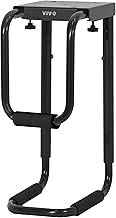
The VIVO MOUNT-PC04B offers a robust under-desk solution with a 66 lb capacity and five-height settings. Its adjustable width (5″ to 10″) and sturdy steel frame provide a firm, wobble-free hold. It requires a desk with thickness and edge clearance suitable for mounting and is ideal for larger PC towers needing secure, space-saving placement under the desk.
TOPSKY Adjustable Under-Desk PC Mount

TOPSKY’s mount emphasizes tool-free, three-step installation, designed to fit certain electric standing-desk legs (65×45mm, 75×45mm, 80×50mm). It lifts the PC off the floor to minimize dust and moisture contact while promoting airflow through an open-frame design. The mounting system clamps directly to the desk leg, providing a secure, stable platform for most towers up to 50 lbs.
CoJewe Under Desk PC Mount

CoJewe’s model is a size-specific under-desk mount with a clamp-on design and non-slip pads. It supports PC widths from about 5.7″ to 9.84″ and is intended for standing-desk setups that require precise leg dimensions (65mm, 75mm, or 80mm). The design emphasizes open airflow while elevating the PC to protect it from kicks, dust, and moisture. Accurate size selection is essential for successful installation.
VIVO Adjustable Under Desk Wall Mount (MOUNT-PC01)
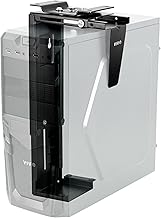
This versatile VIVO option supports under-desk and wall mounting with an adjustable width of 3.5″ to 7.8″ and height from 11.5″ to 20.5″. Its 135-degree swivel enhances backside port access and cable management, making it suitable for desks with overhangs or wall-adjacent arrangements. It holds up to 22 lbs, offering a lower-capacity alternative for smaller PC towers.
Buying Guide
- Weight capacity: Match the mount to your PC’s weight. Higher capacities reduce wobble and increase stability for larger towers.
- Leg compatibility: Some mounts are size-specific. Measure desk leg dimensions (width and thickness) before purchasing to ensure proper fit.
- Installation method: Clamp-on and under-desk designs avoid drilling but require sturdy legs. Verify desk material and leg shape for secure mounting.
- Airflow and cooling: Open-frame designs and elevated placement improve cooling and reduce heat buildup inside the PC.
- Cable access: Look for mounts offering easy access to ports and ample space behind the PC for cable runs and management.
- Access to ports: If you often need rear ports, consider swivel or wall-mount options that provide ample clearance to reach connectors.
- Desk compatibility: If using a standing desk with inverted legs or non-standard legs, confirm the mount supports that configuration or choose a model with broad compatibility.
- Maintenance: Consider models with anti-slip pads or gasket seals to prevent slipping during desk height changes.
All listed options provide a combination of space-saving design, airflow optimization, and secure mounting to support a standing desk workflow. When choosing, prioritize leg compatibility, weight capacity, and ease of installation to align with your workspace needs.