Countertop pop up outlets blend convenience with a clean, streamlined look. From homes to conference rooms, these recessed power centers keep cords tidy while delivering USB-C, USB-A, and AC outlets exactly where you need them. This guide highlights five top options, including models with wireless charging, surge protection, and tamper-resistant design. Read on to compare installation, charging capacity, and safety features to choose the best pop up outlet for your space.
Summary Of Chosen Products
- Jgstkcity 2.5″ Hole Pop Up Outlet — 4 AC outlets, 2 USB-C, 2 USB-A, 15A, tamper resistant
- ANNQUAN 4″ Pop Up Outlet With Qi2 Wireless Charger — 4 AC outlets, 2 USB-C, 2 USB-A, 15A, wireless charging
- ANNQUAN 3.15″ Pop Up Countertop Outlet — 4 AC outlets, 2 USB-C, 2 USB-A, wireless 15W
- ANNQUAN 2″ Space Saver Pop Up Outlet — 2 AC outlets, 20W USB, splash resistant
- HEZI Pop Up Outlet With Wireless Charger — 8 outlets total, 15W wireless, 2 USB-C, 2 USB-A, 15A
Jgstkcity 2.5 Inch Hole Pop Up Outlet

The Jgstkcity unit fits a 2.5-inch hole and uses a built-in spring-loaded pop-up mechanism. It installs by tightening the surrounding ring after sliding the body into the hole. Designed to blend with granite or quartz countertops, it rises when needed and disappears when not in use. It provides four AC outlets plus two USB-C ports and two USB-A ports, enabling simultaneous charging for multiple devices. The receptacle is tamper resistant to meet safety codes, helping protect against accidental shocks in households with children.
ANNQUAN 4 Inch Pop Up With Qi2 Wireless Charger

This 4-inch model features Qi2 magnetic wireless charging for smartphones and other compatible devices, alongside four AC outlets and two USB-C ports plus two USB-A ports. It includes automatic overload protection and auto-reset functionality to safeguard circuits. The wireless charging capability is designed to deliver faster, more reliable charging while maintaining device health. A four-sided design minimizes interference, ensuring accessible outlets from multiple angles. This unit is ETL listed for safety.
ANNQUAN 3.15 Inch Pop Up Countertop Outlet

This 3.15-inch model offers a compact footprint with 4 AC outlets and 4 USB ports (2 USB-C, 2 USB-A) plus a 15W wireless charger. It’s designed for easy installation by removing the ring and sliding the body into a 3.15-inch hole, then securing with the ring. A recommended activation routine (popping up and down several times) helps ensure full spring action. It’s ETL listed and emphasizes a balance between accessible power and countertop aesthetics.
ANNQUAN 2 Inch Space Saver Pop Up Outlet

Designed for tight spaces, this 2-inch pop up outlet maximizes counter space with two 12-amp receptacles and 20W USB charging ports. The design is splash resistant and retracts completely when not in use, keeping the surface sleek. It sinks up to 8 inches beneath the countertop and requires a careful check of the bottom size of the desk or island before purchase. A gentle press on the top reveals the outlets for quick access, making it ideal for desks and kitchen islands where space is at a premium.
HEZI Pop Up Countertop Outlet With Wireless Charger
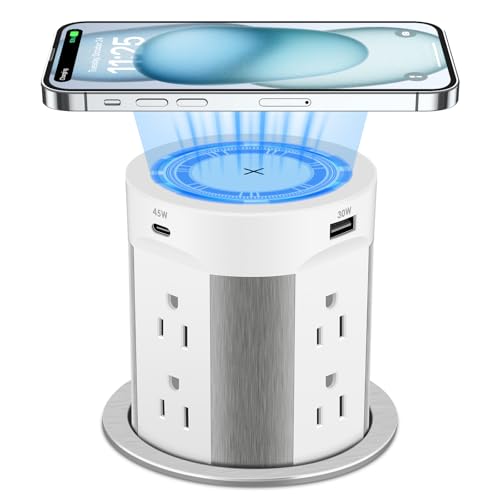
This 13-in-1 pop up outlet combines eight AC outlets with two USB-C and two USB-A ports, plus a 15W wireless charger on top. It provides a robust power delivery setup (up to 75W total for USB outputs and 15W wireless) and is designed with a fully automatic retractable mechanism to keep surfaces clean when the unit is hidden. The design emphasizes surge protection and tamper-resistant outlets to improve safety in busy kitchens, offices, or conference tables.
YYSKA Pop Up Outlet with Wireless Charger

This model pairs a built-in 15W wireless charger with four outlets (two USB-C and two USB-A) and a 3.35-inch desk hole compatibility. It supports multiple charging options, including PD20W USB-C ports for fast device charging and a 120V 15A AC outlet. The unit is designed to glide flush when retracted and offers an aesthetically modern solution for kitchens, home offices, or conference spaces while keeping cables out of sight.
Buying Guide: Key Purchase Considerations
- Hole size and installation: Measure countertop thickness and available cutout dimensions. Some models fit 2.0–2.5 inches, others require 3.15–4 inches. Verify flush fit and mounting ring compatibility for a clean look.
- Power and outlets: Assess the number and type of outlets (AC, USB-C, USB-A) and the presence of wireless charging. Consider whether you need PD 20W, 45W, or higher for devices like tablets or laptops.
- Safety features: Look for tamper-resistant (TR) receptacles, surge protection, and automatic overload or circuit protection. ETL or UL listings indicate certification to safety standards.
- Wireless charging compatibility: If wireless charging is important, check the charger’s wattage (commonly 10–15W or higher) and placement (top surface under a non-metallic plate). Some models require central contact for reliable charging.
- Retrofit vs. new install: Some units are designed for quick insert-and-tighten installation, while others require additional wiring or a dedicated circuit. Ensure you have access to a power source and proper wiring knowledge or hire a licensed electrician for complex installations.
- Protection and durability: Consider splash resistance for areas near sinks or kitchens. Recessed designs should withstand frequent use without damage to the surface underneath.
- Aesthetics and surface compatibility: Choose finishes (white, black, or stainless) that match your countertop or furniture. Ensure the device sits flush to preserve a seamless surface appearance.
- Maintenance and longevity: Check longevity of motorized or spring-loaded mechanisms and whether parts are serviceable or require replacement.