In modern meeting rooms, a sleek, reliable power hub is essential. This guide highlights top conference table power outlets that keep devices charged and connected without clutter. From pop-up grommets to wireless charging hubs, these options blend safety, speed, and organization for American offices and classrooms.
Summary of selected products:
- Kungfuking Conference Table Power Hub — 7-in-1 connectivity with HDMI, network, USB-C, USB-A, and two AC outlets.
- TIANDIGP Pop Up Outlet — Aluminum panel, 4 AC outlets, USB-C PD 20W, built for durable hidden installation.
- JACEPFY Conference Table Power Outlet — PD 20W USB-C, 3 outlets, USB-A, and USB-C charging with a 45-degree pop-up design.
- Jiangce Conference Table Power Hub — HDMI 4K, 20W PD charging, dual AC outlets, network and USB options.
- Kungfuking 15W Wireless Conference Table Power Hub — Wireless charging plus USB-C/USB-A and four AC outlets.
Kungfuking Conference Table Power Hub

Designed as a UL-listed, 7-in-1 multimedia connectivity box, this Kungfuking hub is built for desk-top conference use. It comes with HDMI and network ports, 3 USB ports, 2 AC outlets, and a 20W USB-C PD port plus USB-A fast charging. The unit is rated at 125V/12A/1500W and includes a 6-foot power cord, delivering a compact solution that reduces cable clutter while expanding desktop capabilities. This hub targets meeting spaces that demand reliable device charging and data connectivity in one discreet enclosure.
TIANDIGP Pop Up Outlet

This embedded countertop pop-up outlet integrates aluminum alloy construction with a fireproof plastic frame for safety and longevity. It serves indoor spaces such as offices, meeting rooms, and studios, offering 4 AC outlets with a total power rating up to 1875W, plus USB-C PD 20W fast charging. The design keeps surfaces neat, with a recessed profile that hides the outlets when not in use, making it ideal for high-traffic conference tables and shared work areas.
JACEPFY Conference Table Power Outlet

This PD 20W USB-C fast charging hub focuses on efficient power distribution for multiple devices. It features a 45-degree pop-up mechanism, a damped spring for smooth operation, and a multifunctional hub with 3 AC outlets plus USB-A and USB-C ports. The charging profile supports traditional USB devices as well as newer USB-C devices, allowing fast charging for phones, tablets, and laptops during meetings.
Jiangce Conference Table Power Hub

This Jiangce model combines a pop-up power hub with HDMI and USB capabilities, designed for conference desks and workspaces. It includes two AC outlets, 20W USB-C PD fast charging, and HDMI with 4K compatibility, along with USB 3.0 and network enabling robust data transfer and device charging during meetings. Its intelligent charging distribution helps optimize power draw across connected devices.
Kungfuking 15W Wireless Table Hub

This 15W wireless conference table power hub blends wireless charging with traditional connectivity. It includes 4 AC outlets, a 20W USB-C port, and dual 18W USB-A ports, plus a 6-foot cord for flexible placement. The wireless charging pad sits at the center, enabling easy contact charging for compatible devices while guests and presenters use USB-A and USB-C devices in parallel. The metal construction emphasizes durability for busy conference environments.
Pop Up Power Strip With PD 30W
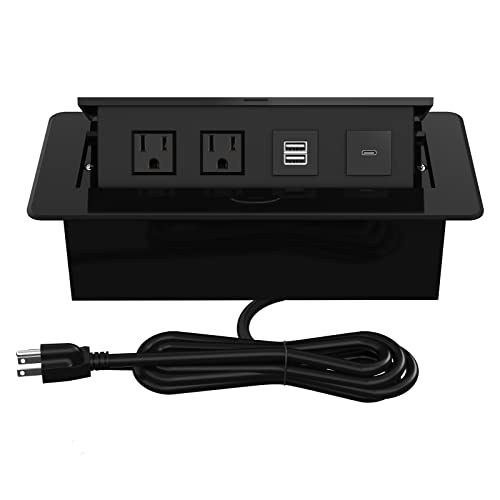
Note: This alternative offers PD 30W USB ports and recessed pop-up outlets, with 2 AC outlets and USB-A/USB-C charging. It is designed for conference rooms and tables where quick access to power is needed, with a lid feature to protect the outlets when not in use and to keep the table surface neat.
Buying Guide
Key considerations when choosing a conference table power outlet:
- Power capacity and safety certifications: Look for UL listings and clear wattage limits to prevent overloading. For rooms with high device density, select hubs with higher wattage and multiple outlets.
- Connectivity needs: Assess required ports (HDMI, USB-C, USB-A, Ethernet, VGA, audio). HDMI and USB-C PD are common; USB-A remains useful for older devices.
- Pop-up vs. fixed: Pop-up grommets minimize clutter and reduce trip hazards; fixed boxes offer ready access without motion. Consider table thickness, installation depth, and maintenance access.
- Charging speed: USB-C PD (up to 20W or more) supports faster charging for smartphones and laptops. USB-A ports should offer ample amperage for tablets and phones.
- Durability and materials: Aluminum or metal housings resist wear in busy meetings. Fire-resistant plastics and secure latching mechanisms add safety in shared spaces.
- Cable management: Features like lid covers, cable trays, and hidden wiring help keep desktops tidy and reduce cord clutter.
- Installation versatility: Some units fit standard desk grommet holes; others require custom cutouts. Verify compatibility with your conference table dimensions and power supply.
- Security and usage policies: Consider lockable lids or tamper-resistant designs in public-facing meeting rooms or shared spaces.
Choosing the right conference table power outlet involves balancing charging speed, connectivity, and aesthetics with safety and durability. For spaces that host frequent presentations and collaborative sessions, a combination of pop-up access, HDMI/USB-C/USB-A support, and reliable power delivery can streamline workflows and reduce cable clutter.